Tutorial 1 of 6
Your first supply-chain review in 5 minutes
Beginner 5 min
Open the Node.js release template, run all checks, read the release gate and the dashboard, and find the first thing to fix. No account, nothing to install.
Provenance keeps your project in this browser. When a check runs, its input (for example an SBOM or a package name) is sent to the usefulweb.site API, which runs the matching security tool and sends the result back.
1. Open a template
Click Launch Provenance. On a first visit the dashboard shows the template gallery. Choose Node.js release review and press Open template (or use File → Templates… later).
The template contains five assets and no results yet: the CycloneDX SBOM of an Express API, its runtime container image, the express and sigstore packages and the expressjs/express repository. The asset list on the left groups them by type.
2. Run all checks
Press Run all checks in the top bar (or Ctrl+Shift+Enter). The status bar shows a progress bar such as Running checks: 6 of 14 done. Each asset runs every tool that fits it — the SBOM runs the SBOM Explorer and the SBOM License Checker, each package runs five tools. Checks run two at a time; when the API asks Provenance to slow down it waits and retries by itself.
You can keep working while checks run: open an asset, read results, type notes.
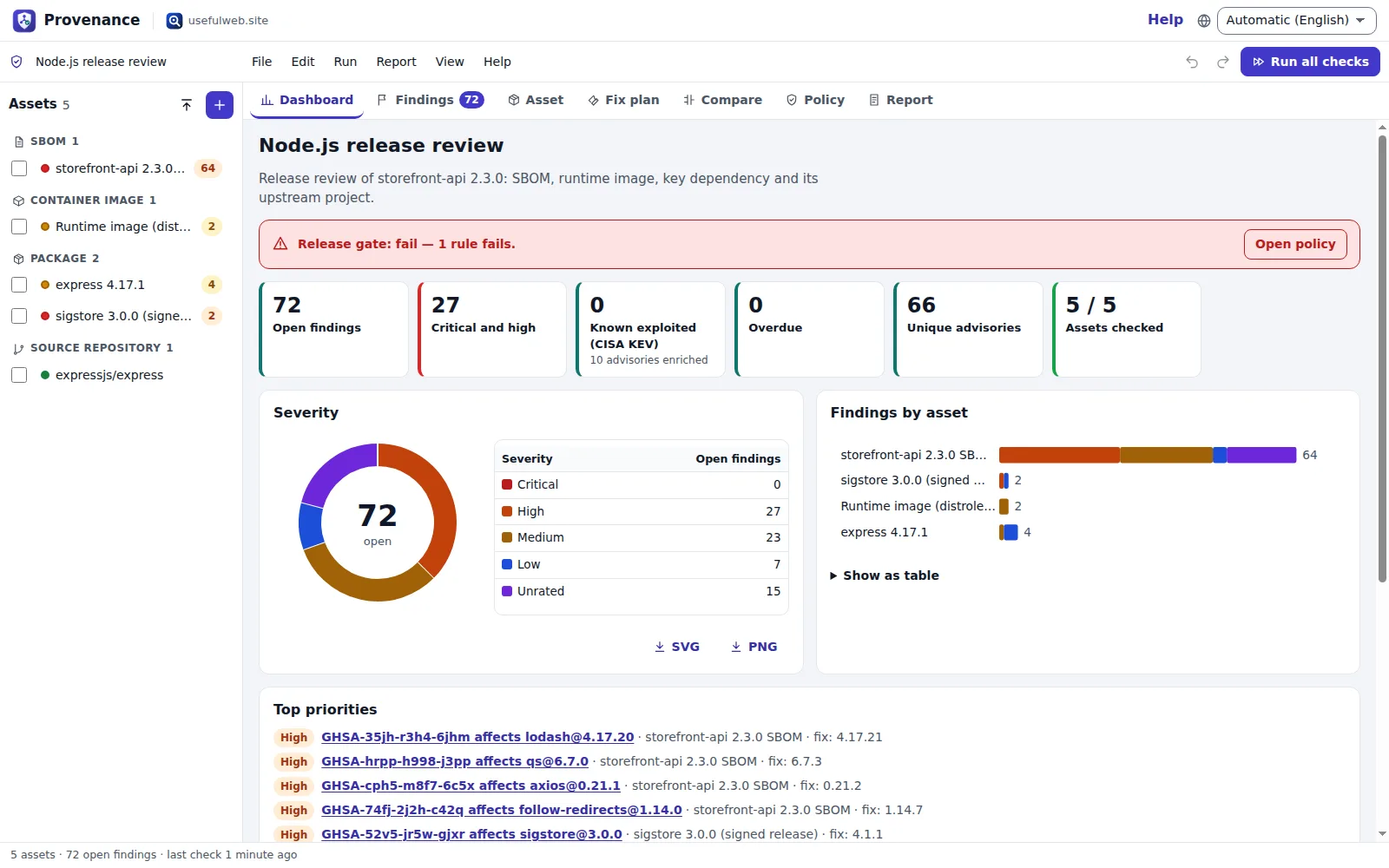
3. Read the dashboard
- Release gate — pass, warnings or fail according to the policy. With the default policy, open vulnerabilities rated high or worse fail the gate.
- KPI cards — open findings, critical and high, known exploited (CISA KEV), overdue, unique advisories and how many assets have results.
- Severity and Findings by asset — the same numbers as a chart and as a table (Show as table).
- Top priorities — the eight open findings with the highest priority. Click one to open it in the findings register.
- Coverage and freshness — checks that failed, never ran, or whose input changed since the last run, each with a Run button.
4. Enrich with KEV and EPSS
Under Next steps, press Enrich now (or Run → Enrich advisories with CISA KEV and EPSS). Provenance asks the CVE Relationship Graph tool about the ten most important advisories. Advisories in the CISA catalog of known exploited vulnerabilities get +40 priority, and the EPSS probability adds up to 30.
5. Find the first fix
Open the Fix plan tab. It lists one upgrade per vulnerable component with the version that closes all its known advisories — for example node-forge 0.10.0 → 1.4.0, marked major because the major version changes.
Your project is saved in this browser automatically. Next time you open Provenance it reopens where you left off.
What next?
Ready to try it?